

Managing donor relationships through spreadsheets and disconnected email threads costs nonprofits real money and real relationships. When you decide to build a nonprofit donor portal website, you give donors a secure, personalized space to manage their giving, update their information, and stay connected to your mission. The result is fewer administrative headaches for your team and stronger loyalty from the people who fund your work. This guide walks you through every stage of the process, from planning and platform selection to launch and ongoing optimization, with practical advice grounded in how nonprofit fundraising actually works.
Table of Contents
- Key Takeaways
- What you need to plan before you build
- How to build and launch your donor portal
- Common challenges when managing your donor portal
- Measuring success and optimizing your portal
- My honest take on nonprofit donor portals
- Ready to build a donor portal that works?
- FAQ
Key Takeaways
| Point | Details |
|---|---|
| Plan before you build | Define your fundraising goals and CRM needs before selecting any platform or technology. |
| Integration beats features | Connecting your portal to accounting and CRM systems matters more than flashy front-end design. |
| Portals differ from donation pages | A donor portal is a secure, authenticated environment, not a public-facing giving form. |
| SaaS reduces long-term costs | Specialized SaaS platforms typically cost less to maintain than fully custom-built solutions. |
| Measure and refine continuously | Track donor retention and portal usage rates after launch to improve engagement over time. |
What you need to plan before you build
Before a single line of code is written or a platform is selected, you need clarity on what the portal must accomplish. Start by listing your fundraising goals in concrete terms. Are you trying to increase recurring giving? Reduce donor churn? Give major donors a self-service experience? Your answers will determine which features are non-negotiable and which are nice-to-have.
Once your goals are defined, evaluate your current technology stack. Donor management software helps nonprofits store donor data, track giving history, and manage communications in one centralized system. If you already use a CRM like Salesforce Nonprofit Success Pack or a purpose-built tool, your portal must connect to it cleanly. Rebuilding your data architecture around a new portal is expensive and disruptive.
Key prerequisites to assess
- Payment processor compatibility: Confirm that your chosen processor (Stripe, PayPal, Authorize.Net) integrates with the portal platform.
- PCI compliance: Any portal that handles credit card data must meet Payment Card Industry standards. SaaS platforms typically handle this for you.
- Data privacy requirements: If you serve donors in California or the EU, CCPA and GDPR obligations apply to how you store and process personal data.
- Hosting and performance: Shared hosting will not hold up during year-end giving surges. Plan for scalable cloud hosting from the start.
- Branding requirements: Your portal should feel like a natural extension of your mission, not a generic third-party tool with your logo slapped on it.
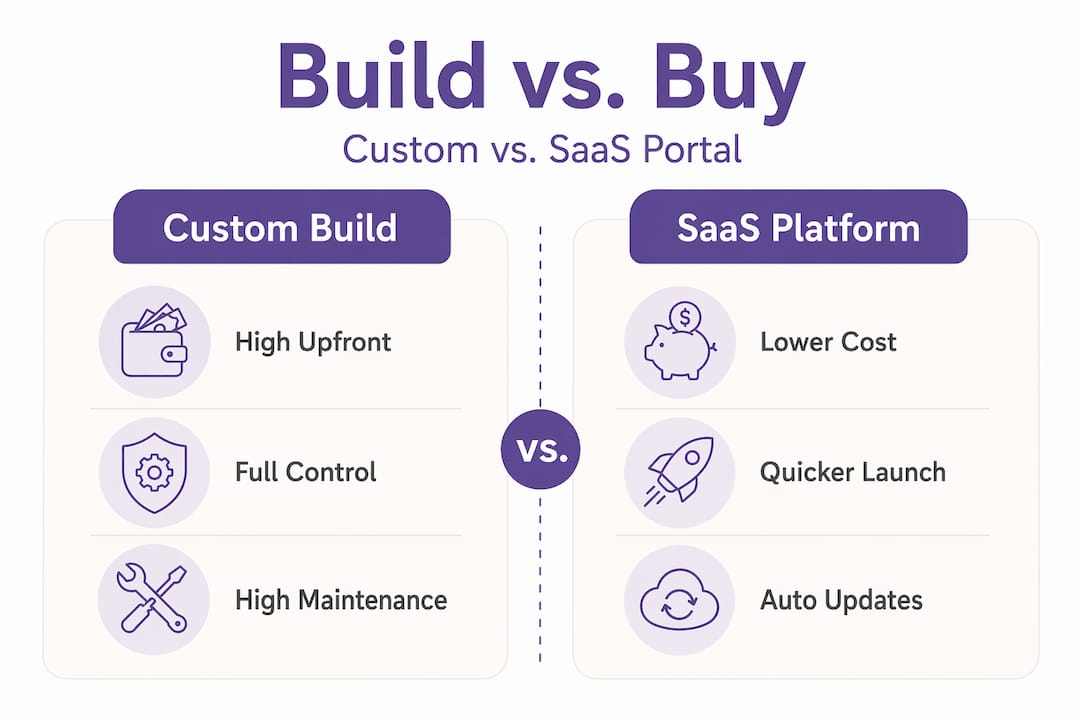
| Consideration | Custom Build | SaaS Platform |
|---|---|---|
| Upfront cost | High | Low to medium |
| Security maintenance | Your responsibility | Vendor managed |
| Customization | Unlimited | Template-based |
| Time to launch | Months | Days to weeks |
| CRM integration | Manual setup | Often pre-built |
SaaS donor management platforms often result in lower total cost of ownership compared to custom solutions requiring constant security monitoring and compliance management. For most nonprofits, especially those without a dedicated IT team, SaaS is the smarter starting point.
Pro Tip: Before committing to any platform, request a sandbox or trial environment and run your most common donor scenarios through it. Real-world testing reveals integration gaps that sales demos never show.
How to build and launch your donor portal
With your plan in place, the build process becomes a series of concrete decisions rather than an overwhelming project. Here is a step-by-step approach that works for organizations at most budget levels.
-
Choose your platform. Options range from no-code builders and WordPress-based solutions to specialized donor portals built into platforms like Bloomerang, DonorPerfect, or custom CRM tools. Evaluate each option against your prerequisite checklist, not against feature marketing.
-
Map the donor user flow. Walk through the full experience from a donor’s perspective: account creation, login, viewing giving history, updating payment methods, downloading tax receipts, and updating contact preferences. Every friction point in this flow is a reason a donor might abandon the portal entirely.
-
Build the core features first. The best donor portal features to prioritize in your first version include recurring donation management, automated tax receipt generation, donation history, and profile self-service. Skip anything that does not directly serve the donor or save your team time.
-
Connect your systems. Integrate with your CRM, accounting software, and email marketing platform before you launch. Automated tax receipt generation reduces manual work significantly, especially during peak giving seasons, and donors expect instant acknowledgment of their gifts.
-
Run security and UX testing. Test for broken authentication flows, data exposure risks, and mobile responsiveness. A donor portal with a security vulnerability is worse than no portal at all.
-
Soft launch before full rollout. Invite a small group of trusted donors to use the portal before announcing it to your full list. Their feedback will surface usability issues your team missed because you are too close to the project.
| Feature | Donor Benefit | Staff Benefit |
|---|---|---|
| Recurring donation management | Easy to pause, modify, or cancel | Reduces cancellation calls |
| Tax receipt automation | Instant documentation | Eliminates manual processing |
| Donation history access | Full transparency | Fewer donor inquiries |
| Profile self-service | Donors update their own data | Reduces data entry errors |
| Communication preferences | Donors choose contact frequency | Improves email deliverability |
Pro Tip: Design the portal’s mobile experience first, not as an afterthought. More than half of nonprofit website traffic now comes from mobile devices, and a clunky mobile portal will drive donors back to writing checks.

Common challenges when managing your donor portal
The most persistent problems nonprofits face with donor portals are not technical. They are strategic and operational. Understanding them before they happen is the difference between a portal that gets used and one that gets ignored.
One of the most frequent and costly mistakes is confusing a donor portal with a public donation page. A donor portal is a secure, authenticated environment for constituents to manage gifts, unlike public donation pages designed for anonymous transactions. When these two functions get conflated, you end up with either weak security on the portal or a confusing experience for first-time donors who do not yet have accounts.
Accounting integration is the other area where nonprofits get into trouble fast. Integration with back-office accounting software is more critical than the portal interface itself, because manual reconciliation of donations creates errors that compound over time. If your portal and your accounting system do not talk to each other automatically, your finance team will spend hours each week fixing discrepancies.
Here are additional challenges to prepare for:
- Low donor adoption: Donors will not use a portal they do not know about. Build a clear onboarding sequence: an email announcement, a tutorial video, and direct support for donors who have questions.
- Data quality degradation: Portals accumulate duplicate records and outdated information over time. Set a quarterly schedule to audit and clean your donor database.
- Feature creep after launch: Every department will want to add something to the portal. Prioritize additions based on donor feedback and measurable impact, not internal requests.
- Security complacency: Threats evolve. Schedule annual penetration testing and keep dependencies patched, or choose a SaaS platform where the vendor handles this automatically.
“Successful nonprofits prioritize systems allowing easy data segmentation and automated workflows to track the donor lifecycle effectively.”
Scaling your portal is a question of timing. Build your first version lean, measure what donors actually use, and expand features in response to real behavior rather than anticipated needs. This approach keeps costs manageable and keeps the portal focused on what matters.
Measuring success and optimizing your portal
Launching the portal is not the finish line. The organizations that get the most from their donor engagement platform are the ones that treat it as a living system, not a one-time project.
| Metric | What it tells you | How to act on it |
|---|---|---|
| Donor retention rate | Whether donors are staying engaged over time | Improve stewardship communications |
| Portal login frequency | How often donors actively use the portal | Simplify navigation or add value features |
| Recurring gift conversion | Percentage of one-time donors becoming recurring | Prompt recurring giving at donation confirmation |
| Tax receipt download rate | Whether donors find receipts easily | Improve receipt visibility in the portal dashboard |
Collect donor feedback through short surveys at natural moments, after a donation is completed or after a donor updates their profile. Ask two or three specific questions rather than a long form. Response rates go up and you get more actionable data.
AI features can surface lapsed donors, predict giving likelihood, and help draft personalized outreach emails. If your CRM or portal platform includes these capabilities, use them. They reduce the time your team spends guessing which donors to contact and improve the quality of every outreach.
Pro Tip: Set a monthly 30-minute portal review meeting with one staff member from fundraising and one from communications. Review the top three metrics together and agree on one small change to test that month. Small, consistent improvements compound into significant results.
My honest take on nonprofit donor portals
I’ve worked with enough nonprofits to say this clearly: the organizations that struggle most with donor portals are the ones that started with features instead of strategy. They picked a platform because it looked good in a demo, launched without testing the integration to their CRM, and then wondered why their team still spent hours every week on manual data entry.
In my experience, the single biggest predictor of portal success is data quality before launch. If your existing donor records are a mess of duplicates, incomplete addresses, and mismatched giving histories, no portal in the world will fix that for you. The portal will just surface the problem more visibly. Clean your data first, even if it takes an extra month.
I’ve also seen nonprofits over-invest in visual customization while under-investing in the back-end integrations that make the portal actually useful. A mission-driven website that reflects your branding matters, but donors care far more about whether they can download their tax receipt in 30 seconds than whether the button is the perfect shade of your brand color.
My advice on vendor selection: talk to the support team before you sign anything. The quality of implementation support and ongoing technical help varies enormously, and you will need it. References from similar-sized nonprofits in your sector are worth more than any feature comparison chart.
— Matt
Ready to build a donor portal that works?
If you are planning to build a nonprofit donor portal website and want experienced guidance from people who have worked with organizations like yours since 2005, Nonprofit-webdesign is ready to help. We design and develop purpose-driven websites that serve as a strong foundation for donor engagement, with portals that connect cleanly to your CRM, your accounting system, and your email platform.
Our website redesign services include integrated donor portal development built for accessibility, mobile performance, and SEO visibility. We also offer ongoing support plans to keep your portal secure, updated, and performing well after launch. Whether you are starting from scratch or improving an existing system, we make the process straightforward. Reach out to Nonprofit-webdesign today and let’s talk about what your donors actually need from your online experience.
FAQ
What is a donor portal and how does it differ from a donation page?
A donor portal is a secure, authenticated space where donors log in to manage their giving history, update payment methods, and download tax receipts. A public donation page is an open, unauthenticated form for processing one-time gifts.
How long does it take to build a nonprofit donor portal website?
A SaaS-based portal can be configured and launched in one to four weeks. A custom-built portal typically takes three to six months, depending on integration complexity and the size of your team.
What are the most important features in a donor portal?
The best donor portal features to prioritize are recurring donation management, automated tax receipt generation, donation history access, and donor profile self-service. These four functions address the most common donor needs and reduce the most staff time.
How do I get donors to actually use the portal?
Send a clear onboarding email with a direct link and a short tutorial. Follow up with donors who have not logged in within 30 days. Make the first experience simple and valuable by surfacing their full giving history immediately upon login.
Should I build a custom portal or use a SaaS platform?
For most nonprofits, a SaaS platform is the better choice because it reduces security maintenance burden and speeds up launch. Custom development makes sense only when your organization has specific workflow requirements that no existing platform can meet and has dedicated technical staff to maintain the system.