

Your nonprofit’s website is not just a digital brochure. It’s where donors give, volunteers sign up, and clients seek help. Understanding why website security matters for nonprofits goes beyond protecting data. It protects your mission, your reputation, and the people who trust you. Yet most nonprofit teams assume their hosting provider handles security, or that cybercriminals only target large corporations. Neither is true. This guide breaks down the real threat environment facing nonprofits today, the vulnerabilities you may already have, and the practical steps any organization can take to build a stronger defense without a large IT budget.
Table of Contents
- Key Takeaways
- Why website security matters for nonprofits
- Common vulnerabilities that lead to breaches
- Practical security steps nonprofits can take
- Real-world threats: spoofed sites and ransomware
- My take on security as a leadership problem
- Protect your nonprofit with expert web support
- FAQ
Key Takeaways
| Point | Details |
|---|---|
| Nonprofits are prime targets | Attackers exploit limited security resources and human error common in nonprofit organizations. |
| Hosting security is not enough | Application-level threats require active site-level monitoring beyond what hosting providers cover. |
| MFA stops most attacks | Enabling multi-factor authentication reduces hacking likelihood by 99% at minimal cost. |
| Governance is a security tool | Boards that integrate cybersecurity oversight protect donor trust and reduce regulatory exposure. |
| Free tools close major gaps | Programs like Microsoft 365 Business Premium can cover 60-80% of controls at no cost. |
Why website security matters for nonprofits
The assumption that hackers target banks and tech companies, not charities, is one of the most costly misconceptions in the sector. Nonprofits are actually the second most targeted sector for cyberattacks, and the reasons make sense when you think about it. Your website collects donor payment information, stores volunteer and client records, and often runs on platforms like WordPress with limited staff oversight. That combination is attractive to attackers.
Automated scanning tools probe thousands of websites per second looking for unpatched software, weak passwords, and open vulnerabilities. These tools do not discriminate by organization size or mission. A small food pantry running an outdated plugin is just as exposed as a large advocacy organization. The automated opportunistic attacks that nonprofits face exploit exactly this kind of neglect.
“Your hosting provider secures the network and server infrastructure. They do not secure your website’s application layer — the themes, plugins, login pages, and forms where most attacks actually land.”
This distinction matters enormously. Many nonprofits believe that paying for managed hosting means their site is fully protected. In reality, hosting-level security and site-level security are two separate layers. The gap between them is where attackers operate. Understanding this helps you ask the right questions about your current setup and your nonprofit website standards from the start.
When a breach happens, the consequences go well beyond a technical headache. Donor payment data gets stolen. Client records are exposed. Your site goes offline during a critical campaign. Rebuilding trust after a breach can take months, and some donors never return.
Common vulnerabilities that lead to breaches
Most nonprofit website breaches do not happen because of sophisticated hacking. They happen because of predictable, avoidable mistakes. Knowing what those mistakes are puts you in a position to fix them before an attacker finds them first.
Here are the most common vulnerability patterns seen across nonprofit organizations:
- Reused or weak passwords. Staff members often use the same password across multiple platforms. One compromised credential from a third-party data leak can open the door to your CMS, email, and donor database simultaneously.
- No multi-factor authentication. Logging in with just a username and password is no longer adequate. Without MFA, a stolen password is all an attacker needs.
- Outdated WordPress plugins and themes. Plugin developers release security patches regularly. Sites that go weeks or months without updates become easy targets because known vulnerabilities are publicly documented.
- No cybersecurity policies or training. Research shows that 70% of nonprofits lack basic cybersecurity policies, and 53% provide no staff training. When people do not know what a phishing email looks like, they click on it.
- Social engineering and phishing. Business email compromise and targeted phishing remain the most common attack entry points. Staff members receive emails impersonating executive directors, grant funders, or payment processors, and act on them without verification.
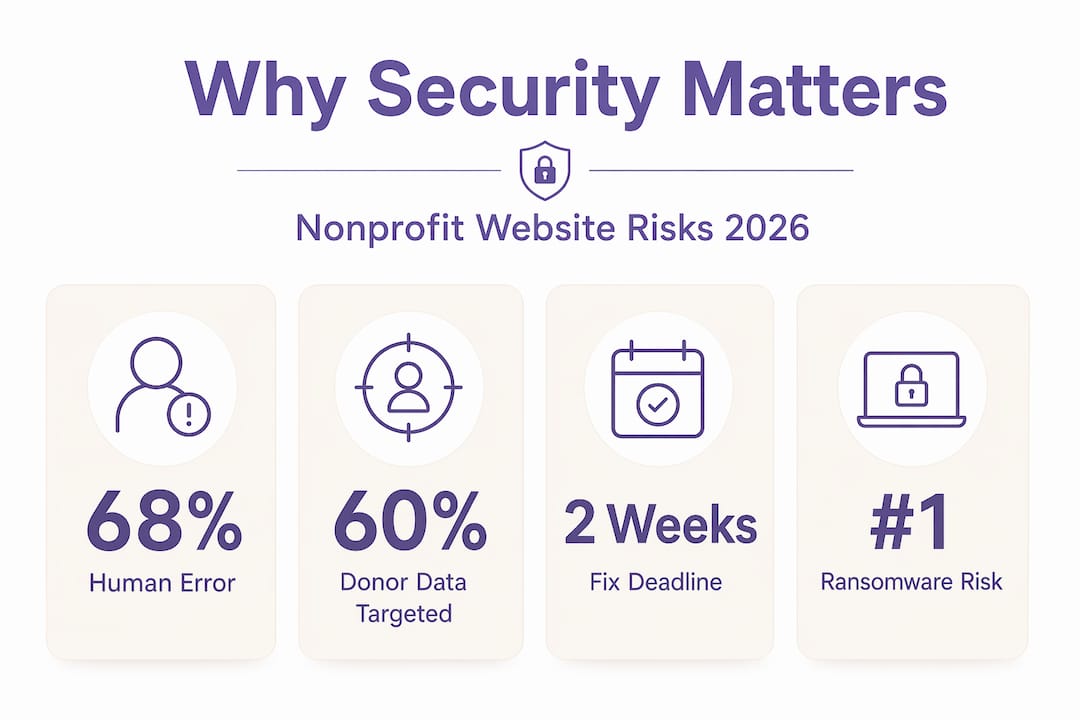
The human factor is not a weakness unique to nonprofits. But 68% of breaches involve human elements like phishing or misdirected actions, and nonprofits carry heightened exposure because training and policies are so often missing.
Pro Tip: Run a free phishing simulation with your team at least once a year. Several tools offer this at no cost. The goal is not to catch people but to show them what real attacks look like so they recognize the pattern in real situations.

Building a culture where staff feel comfortable asking “does this email look right?” is worth more than any single security tool you could install.
Practical security steps nonprofits can take
The good news is that the most effective defenses are not expensive. A few consistent practices, applied across your organization, will close the majority of your risk exposure.
| Security measure | Cost | Impact |
|---|---|---|
| Multi-factor authentication | Free | Reduces hacking risk by 99% |
| Regular plugin and theme updates | Free | Closes known application vulnerabilities |
| Staff phishing awareness training | Free to low-cost | Reduces human error breaches significantly |
| Managed WordPress hosting with security | Low monthly fee | Covers server and application layer monitoring |
| Incident response plan | Free to develop | Speeds recovery and limits breach damage |
| Microsoft 365 Business Premium | Free for eligible nonprofits | Covers MFA, endpoint detection, email scanning |
New 2026 cyber standards now require organizations to address high-risk vulnerabilities within 14 days and enforce MFA at all times, reflecting how quickly the threat environment has shifted. Meeting these standards is achievable for most nonprofits without major investment.
Here is where to focus your energy:
Use managed hosting with built-in security tools. Managed WordPress hosting providers actively monitor for malware, apply server-level patches, and offer backup restoration. This is not the same as shared hosting with a WordPress installer. Pair managed hosting with a dedicated security plugin like Wordfence or Sucuri for site-level coverage.
Enforce MFA across every login. Your WordPress admin, email accounts, donor management system, and cloud storage should all require a second verification step. This single control prevents most credential-based attacks and takes less than an hour to set up across your organization.
Develop a written incident response plan. Knowing in advance who calls the hosting provider, who notifies donors, and who contacts legal counsel removes the panic from a breach. Prepared nonprofits with playbooks respond faster and limit damage more effectively than those who improvise. Run a tabletop exercise once a year to keep the plan current.
Leverage free resources. Most nonprofits can cover 60-80% of security controls through Microsoft’s charity licensing programs and similar free tools. Check your eligibility before spending on paid alternatives.
Pro Tip: Bring your cybersecurity posture to the board once a year as a formal agenda item. Not an IT update. A governance review. Boards that actively oversee cyber risk management create accountability that flows through the entire organization.
Real-world threats: spoofed sites and ransomware
Two specific threats deserve special attention because they are rising sharply among nonprofits and require a different kind of response than standard security hygiene.
Spoofed websites are fraudulent lookalike domains that impersonate your organization to steal donor payments. An attacker registers a domain that looks almost identical to yours, copies your site design, and runs donation campaigns. Donors send money believing they are supporting you. The funds disappear. The reputational damage lands on your organization even though you were the victim.
Rapidly engaging hosts, registrars, and security vendors is critical when a spoofed site is discovered. Filing complaints with reputation services, documenting everything for potential legal action, and notifying your donor base quickly are all part of an effective response. Notably, attempting to disable right-click or hide your source code does not stop determined attackers and actually harms accessibility and SEO in the process. A fast response plan beats any technical deterrent.
“Detection speed is everything with spoofed sites. The longer a fraudulent site operates, the more donors it deceives and the harder the reputational recovery becomes.”
Ransomware is an equally serious threat. Charities are now hit by more ransomware attacks than any other small-to-medium organization category, and 80% of those targeted end up paying the ransom, sometimes more than once. The operational disruption alone, including loss of donor records, program delivery data, and communications systems, can cripple an organization for weeks.
Prevention focuses on regular offsite backups, patched software, and staff training to recognize malicious attachments. Response requires a pre-built plan that does not depend on systems that may be encrypted. Review enterprise-level ransomware prevention strategies to understand how larger organizations approach containment, and adapt those principles to your context.
My take on security as a leadership problem
I’ve watched a lot of nonprofits approach cybersecurity as something the tech person handles. That framing almost always leads to trouble. In my experience, the organizations that avoid serious breaches are not the ones with the most sophisticated tools. They’re the ones where leadership genuinely treats security as part of how they operate.
What I’ve learned is that the most expensive failures come from gaps in process, not gaps in software. An executive director who clicks a phishing link because no one trained them is a governance failure, not a technology failure. A board that has never discussed cyber risk has left a strategic vulnerability unaddressed.
I’ve also seen how paralyzing the complexity can feel for small nonprofits. My honest take: you do not need to solve everything at once. Start with MFA, keep software updated, and write down what you would do if something went wrong. Those three steps alone will put you ahead of most organizations your size.
Cybersecurity is a governance issue that needs to live at the board level, not just in IT. When leadership owns it, the entire organization takes it more seriously. And your donors will feel that confidence, even if they cannot name exactly why.
— Matt
Protect your nonprofit with expert web support
Your website is one of your most important tools for carrying out your mission. Keeping it secure should not require a full IT department.
At Nonprofit-webdesign, we have been building secure, purpose-driven websites for nonprofit organizations since 2005. Our managed hosting and care plans include regular updates, security monitoring, and backup protocols so your team can stay focused on your programs rather than your plugins. If your current site feels outdated, hard to maintain, or built without security in mind, our nonprofit website redesign service rebuilds it to modern standards with accessibility, SEO, and protection built in from the start. You can also explore our full range of design, hosting, and support services to find the right level of care for your organization’s needs and budget.
FAQ
Why are nonprofits targeted by cybercriminals?
Nonprofits collect sensitive donor and client data but often operate with limited security resources, making them attractive targets. Attackers use automated tools that scan for weak passwords and outdated software regardless of organization size or sector.
Does my hosting provider protect my website?
Hosting providers secure server infrastructure and network-level threats but do not protect your site’s application layer, including themes, plugins, and login forms. You need site-level security tools in addition to your hosting plan.
What is the single most effective security measure for nonprofits?
Enabling multi-factor authentication across all logins reduces hacking success rates by 99% and costs nothing to implement on most platforms.
How should a nonprofit respond to a spoofed website?
Act immediately by contacting the fraudulent site’s hosting provider and domain registrar, reporting to browser reputation services, and notifying your donors. A written response plan created in advance makes this process significantly faster and more effective.
Is cybersecurity affordable for small nonprofits?
Yes. Most small nonprofits can cover the majority of critical security controls using free programs such as Microsoft 365 Business Premium for eligible organizations, combined with free security plugins for their website platform.