

Your nonprofit’s website might be well-designed and mission-driven, yet silently losing donors every single day. Understanding why page speed affects nonprofit sites goes far beyond IT checklists. Slow load times quietly suppress donation completions, erode first-time visitor trust, and push your pages down in search results before a potential supporter ever reads a single word. This article breaks down exactly what is happening to your site performance, why it matters for fundraising, and what you can do about it.
Table of Contents
- Key takeaways
- Why page speed affects nonprofit sites more than you think
- How slow load times damage donor trust and conversions
- Page speed, SEO rankings, and organic traffic for nonprofits
- Common causes of slow nonprofit sites and how to fix them
- Sustaining fast performance over the long term
- My perspective: speed is a mission question, not a tech question
- Ready to make your nonprofit site work harder for your mission?
- FAQ
Key takeaways
| Point | Details |
|---|---|
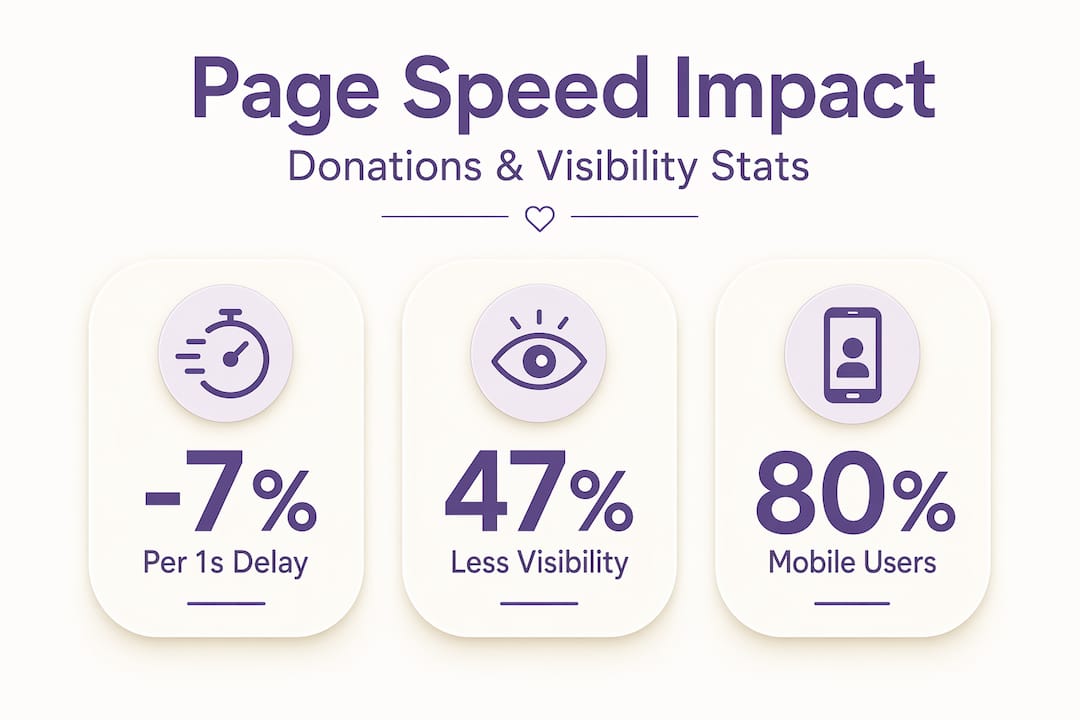
| Speed directly affects donations | A one-second delay can reduce conversions by up to 7%, directly cutting into gift completions. |
| Core Web Vitals influence rankings | Failing Google’s performance thresholds can cost nonprofits up to 47% of organic search visibility. |
| Trust erodes silently | Slow sites cause visitors to leave without feedback, shifting their loyalty to faster organizations. |
| Mobile speed is non-negotiable | Google ranks sites based on mobile performance first, making mobile load time a fundraising priority. |
| Speed requires ongoing maintenance | Performance degrades gradually with each added script or image, requiring regular audits to catch problems early. |
Why page speed affects nonprofit sites more than you think
Page speed is the total time it takes for your website’s content to load and become usable for a visitor. But not all speed metrics measure the same thing, and understanding the distinctions helps you prioritize the right fixes.
Three metrics form the backbone of Google’s performance evaluation, collectively known as Core Web Vitals:
- LCP (Largest Contentful Paint): Measures how long it takes for the main content block on a page to fully render. Google’s optimal threshold is LCP under 2.5 seconds.
- INP (Interaction to Next Paint): Tracks responsiveness. How quickly does your site react when a visitor clicks your “Donate Now” button? The target is under 200 milliseconds.
- CLS (Cumulative Layout Shift): Captures visual stability. If page elements jump around while loading, your CLS score suffers, and so does user trust. Aim for a score below 0.1.
Beyond Core Web Vitals, page load time refers to the total time for all resources to download, while site speed is an aggregate across multiple pages. Nonprofit sites with donation forms, event calendars, and embedded videos often carry more weight than the average website, making these distinctions practically significant.
Pro Tip: Run your site through Google’s free PageSpeed Insights tool and check scores for both desktop and mobile separately. The mobile score is the one Google uses first.
One more factor worth your attention: mobile-first indexing means Google primarily evaluates and ranks the mobile version of your site. If your donation page loads quickly on a laptop but lags on a smartphone, your rankings and your conversions both pay the price.
How slow load times damage donor trust and conversions
Most nonprofit professionals assume that donors leave because the cause did not resonate. Often, the cause resonated just fine. The website got in the way.
Research is clear on this point. Sites loading in 1 second convert 3x better than sites that take 5 seconds. For a nonprofit processing 200 online gifts per month, that difference in conversion rate represents real, measurable fundraising loss. Consider that a 100-millisecond delay reduces conversion rates by nearly 7%. Fractions of a second add up.
“Slow page speed affects donor trust because users equate site performance with organizational reliability. Sluggish sites are perceived as less professional and trustworthy by potential supporters.” — The Trust Impact of Sluggish Sites
The trust issue runs deeper than first impressions. A donor who visits your annual gala registration page and waits too long will not send you an email explaining why they left. They will simply close the tab. Slowness causes visitors to abandon without direct feedback, shifting their loyalty to faster organizations doing similar work. Your competitor in the same cause area gets the gift simply because their site loaded first.
The damage extends beyond one-time gifts. Slow websites affect volunteer signups, newsletter subscriptions, and recurring donation enrollment. Each of these touchpoints has a loading threshold that determines whether the user completes the action or gives up. Research on giving behavior shows that friction in the digital giving experience is one of the top reasons supporters fail to complete a transaction. Page load time is friction you can actually control.

Page speed, SEO rankings, and organic traffic for nonprofits
Your nonprofit’s search visibility directly depends on how fast your pages load. This is not an opinion. Google made Core Web Vitals official ranking signals, which means your site’s performance scores are weighed alongside content quality when Google decides where you appear in search results.
The stakes are significant. Sites that fail Core Web Vitals thresholds see up to 47% less organic visibility compared to sites that pass. For a nonprofit relying on search traffic to attract new donors and volunteers, losing nearly half your discoverability is a serious setback.
How speed acts as an SEO tiebreaker
Consider two nonprofits serving the same community, with similarly written program pages and comparable domain authority. Fast pages consistently outrank slower competitors where content quality is equal. Speed becomes the tiebreaker that determines which organization earns the top spot and, by extension, the click.
| Factor | Faster nonprofit site | Slower nonprofit site |
|---|---|---|
| Core Web Vitals score | Passes all three metrics | Fails one or more |
| Search ranking position | Higher, more clicks | Lower, fewer impressions |
| Crawl efficiency | Pages indexed quickly | New content delayed |
| Mobile visibility | Strong | Reduced |
| Donor first impression | Positive, fast load | Negative, high bounce rate |
There is also the matter of crawl budgets. Search engine bots have a limited amount of time and resources to spend crawling your site. Slow load times hinder search engine bots, which delays indexing for newer content like program updates, impact reports, and time-sensitive campaign pages. If Google cannot crawl your new fundraising campaign page efficiently, it may not appear in search results until the campaign is already over.
Pro Tip: Use Google Search Console’s Page Indexing report to identify pages that are slow to be indexed. Consistent crawl delays on key pages often point to a site-wide speed problem.
Pairing your speed improvements with a well-built SEO strategy for nonprofits gives you the best chance of capturing search traffic from people actively looking for organizations like yours.
Common causes of slow nonprofit sites and how to fix them
Nonprofit sites tend to accumulate speed problems gradually. A new donation widget here, an embedded video there, a third-party event calendar plugin added for a seasonal campaign. Each addition feels minor. Collectively, they create a site that struggles to load in under four seconds.
Here are the most common culprits and practical fixes ranked by impact:
-
Large, unoptimized images. Images are almost always the single biggest contributor to slow load times on nonprofit sites. Compress images before uploading using a tool like Squoosh or ShortPixel. Use modern formats like WebP instead of PNG or JPEG where your platform supports it.
-
Too many third-party scripts. Payment processors, analytics tools, social media share buttons, chat widgets, and pop-up tools each load external scripts that slow your pages. Audit every third-party embed and remove anything that is not actively contributing to your mission or conversions.
-
Unoptimized hosting. Shared hosting plans that were affordable when your site launched may no longer support your traffic or content volume. Managed WordPress hosting or a content delivery network (CDN) can dramatically reduce page load time for nonprofits operating on multiple campaign pages.
-
Excessive plugins and widgets. Many nonprofit sites run on content management systems (CMS) with dozens of installed plugins. Each active plugin adds code that the browser must process. Deactivate and delete plugins that no longer serve a current purpose.
-
No caching configured. Without caching, every visitor triggers a full server request for all page resources. Caching stores a pre-built version of your pages so repeat visitors load them almost instantly.
Pro Tip: Set a performance budget before each new campaign. Decide in advance the maximum file size for images, the number of third-party scripts allowed, and the target LCP score. Treating speed as a budget prevents gradual accumulation of weight.
Reviewing the best practices for nonprofit websites gives your team a practical foundation for maintaining these standards across every page you publish.
Sustaining fast performance over the long term
Fixing your site speed today is only half the work. Without a maintenance plan, performance will degrade again. Speed degradation is cumulative as each new embed, plugin, or media file adds incremental load. The problem rarely announces itself until a major campaign is underway and your donation form takes six seconds to appear.
Sustainable performance requires treating speed as an organizational priority, not a one-time technical project. Here is what that looks like in practice:
- Schedule quarterly audits. Run PageSpeed Insights and Google Search Console reports every three months. Compare scores over time to catch regression before it affects fundraising.
- Build speed checkpoints into your content workflow. Before any new page goes live, check its speed score. This applies to campaign landing pages, event registrations, and blog posts with embedded media.
- Review third-party scripts twice a year. Tools you integrated 18 months ago may no longer be necessary. Each removal is a performance gain.
- Track real-user data, not just lab scores. Google Search Console’s Core Web Vitals report shows how actual visitors experience your site, which can differ from synthetic test results.
- Brief your team on performance impact. Editorial teams tracking speed alongside traffic and engagement see sustained performance gains. Speed is not just an IT conversation. It belongs in your content and fundraising discussions too.
Treating website performance as a shared responsibility across your team makes it far more likely that standards are maintained consistently.
My perspective: speed is a mission question, not a tech question
I have worked with nonprofits long enough to recognize a pattern. When budget conversations happen, speed optimization rarely makes the list. It is not visible in the same way that a redesigned homepage is. You cannot show it to a board member and get an immediate nod of approval. So it gets skipped.
What I have learned is that this framing is the problem. Speed is not a technical nicety. It is a direct expression of how much your organization respects a donor’s time. When someone lands on your site after clicking a social post about your impact, they have given you their attention. A slow site tells them, implicitly, that their time is not a priority. That impression sticks.
I have also seen nonprofits invest thousands in paid advertising, only to send traffic to a landing page that loads in seven seconds on mobile. The cause was compelling. The creative was strong. The campaign still underperformed because the page never gave visitors a fair chance to engage. Speed was the invisible ceiling.
The good news is that speed improvements, unlike many other investments, tend to compound. A faster site ranks better, converts at a higher rate, and builds the kind of user trust that brings donors back. Every second you shave off your load time is working for your mission around the clock.
— Matt
Ready to make your nonprofit site work harder for your mission?
At Nonprofit-webdesign, we have spent nearly two decades helping organizations build websites that do more than look good. A fast, accessible, and well-structured site is the foundation of sustainable fundraising, and we build every project with that in mind.
Whether your site needs a full website redesign to address performance at a structural level or targeted donation funnel optimization to reduce friction at the moment of giving, Nonprofit-webdesign has purpose-driven solutions built specifically for the nonprofit sector. We take care of the technical details so you can focus on your mission. Explore our services and discover how a faster, smarter website can help you reach more supporters and raise more funds with the resources you already have.
FAQ
How does page speed affect nonprofit donations?
Page load time directly impacts conversions. A one-second delay can reduce donation completions by up to 7%, meaning slow sites cost nonprofits real fundraising revenue on every campaign.
What are Core Web Vitals and why do they matter for nonprofits?
Core Web Vitals are Google’s three performance metrics: LCP, INP, and CLS. Sites that fail these thresholds can lose up to 47% of organic search visibility, significantly reducing the number of new supporters who find your organization through search.
How often should a nonprofit audit its website speed?
Quarterly audits are a practical minimum. Speed degrades gradually with each new plugin, image, or script added to a site, so regular monitoring through PageSpeed Insights and Google Search Console helps catch problems before they affect donor experience.
Does mobile page speed matter more than desktop for nonprofits?
Yes. Google uses mobile-first indexing, meaning your mobile site performance determines how your pages rank for all users. Nonprofits with slow mobile donation pages are penalized in both rankings and conversions, regardless of how fast the desktop version loads.
What is the fastest way to improve page speed on a nonprofit site?
Optimizing and compressing images typically delivers the largest immediate improvement. After that, removing unused third-party scripts, enabling caching, and upgrading your hosting plan will produce measurable gains in page load time for nonprofits without requiring a full site rebuild.